- What a Video Switcher Actually Does
- How a Switcher Works at a Live Event
- Types of Switchers: Hardware vs Software
- The Role of the Technical Director (TD)
- Why Your Event Needs a Switcher (vs Just Plugging In)
- When You Don't Need a Switcher
- Common Switcher Features: What the Buttons Do
- How FPC Uses Switchers on Our Shows
What a Video Switcher Actually Does
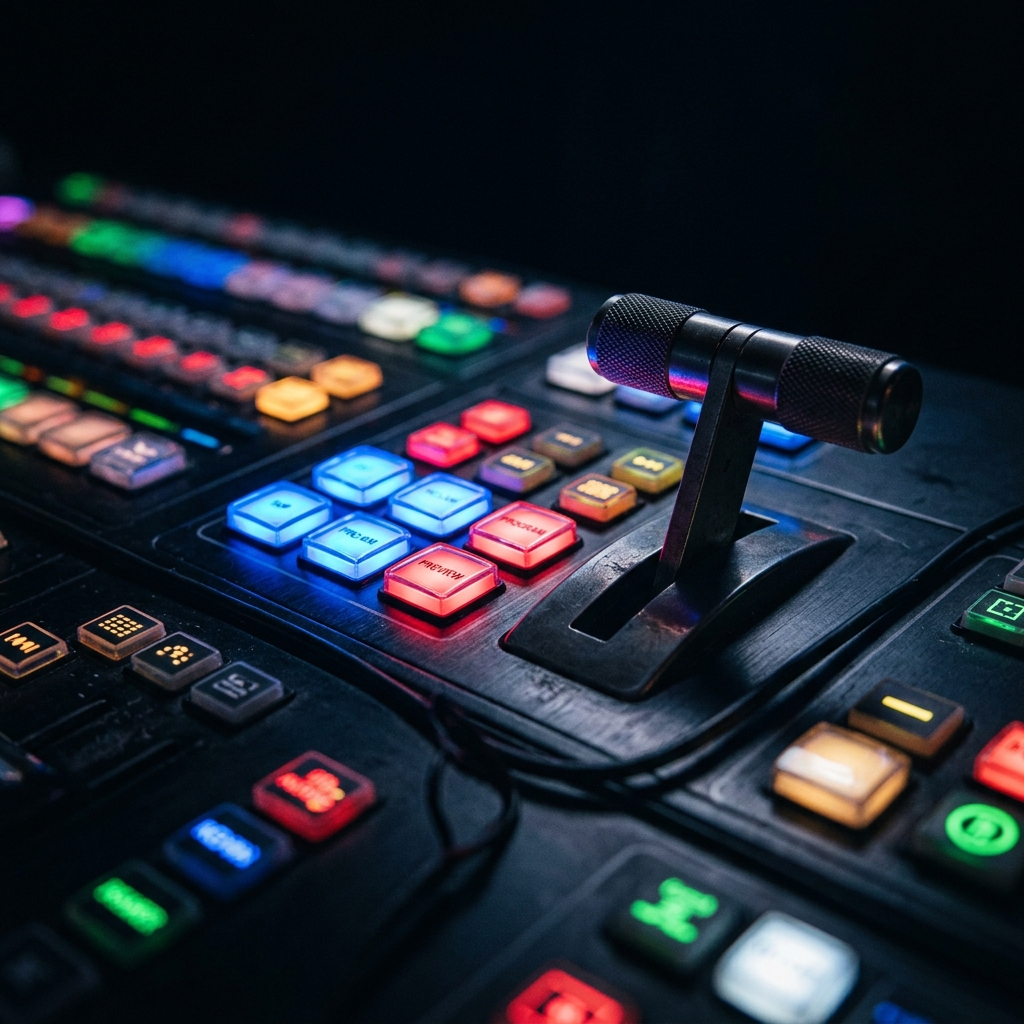
At its core, a video switcher accepts multiple video inputs - laptop presentations, camera feeds, media servers, graphics generators - and outputs a single, composited program feed to your screens, projectors, LED walls and recording or streaming systems. The operator (called a Technical Director or TD) selects which source - or combination of sources - the audience sees at any given moment. This selection happens instantaneously, with professional transitions that maintain the polished feel of a broadcast.
Think of it as the air traffic control tower for your event's visual content. Every source is a plane waiting to land on the runway (your screens). The switcher - and the TD operating it - decides which plane lands, when and in what order. Without that coordination, you have chaos.
How a Switcher Works at a Live Event
To understand what a switcher does at a corporate event, let's walk through a typical general session at a 500-person conference. The stage has a confidence monitor (showing the presenter what's behind them), two large projection screens flanking the stage, an LED wall upstage and an IMAG (image magnification) camera. There's also a livestream going out to remote attendees.
Here's what's connected to the switcher's inputs:
Input 1: Presenter laptop. The keynote speaker's PowerPoint or Keynote presentation, typically fed via an HDMI or SDI connection through a scaler to ensure the signal matches the switcher's native resolution - usually 1920×1080 at 59.94fps for North American events.
Input 2: Backup laptop. A second laptop with the same presentation loaded, ready to cut to instantly if the primary machine crashes. This is standard practice on any professional show - if you've ever been to an event where a laptop died and the show stopped, that event didn't have a switcher with a hot backup.
Input 3: Camera 1. A wide shot of the stage from the back of the room, typically a PTZ (pan-tilt-zoom) camera or a manned broadcast camera on a tripod. This provides the establishing shot and the IMAG feed that lets people in the back rows see the speaker's facial expressions.
Input 4: Camera 2. A tight shot of the podium or presentation area. For events with multiple speakers or panel discussions, additional cameras cover different angles.
Input 5: Video playback. Pre-produced content - sponsor reels, speaker introduction videos, recap packages - played back from a dedicated media server like a Renewed Vision ProPresenter, Resolume Arena or a simple Hyperdeck.
Input 6: Graphics generator. Lower thirds (name titles), countdown timers, logos and other real-time graphics overlaid on the program output.
Now imagine you're the Technical Director. The show caller says in your ear: "Standby camera 1… take camera 1. Standby slides… dissolve to slides. Ready VT roll… roll VT and take." You're executing those transitions in real time, one after another, keeping the visual experience seamless while the program flows. That's what a switcher does - and what a production company coordinates across every department.
Types of Switchers: Hardware vs Software
Video switchers fall into two broad categories - hardware-based production switchers and software-based solutions. Each has its strengths and the right choice depends on the event's scale, requirements and risk tolerance.
Hardware Switchers
Hardware switchers are purpose-built devices with dedicated processing power, physical control surfaces and rock-solid reliability. They are the standard for live corporate events, broadcast television and any production where failure is not an option.
Blackmagic ATEM series. The Blackmagic ATEM line has revolutionized the entry-to-mid-range switcher market. The ATEM Mini Pro and ATEM Mini Extreme are compact, affordable units perfect for streaming-focused events, small corporate meetings and hybrid presentations. The ATEM Constellation series scales up to 40 inputs with full 12G-SDI connectivity for large productions. Blackmagic's ecosystem - including their cameras, HyperDeck recorders and DaVinci Resolve software - makes them a popular all-in-one solution.
Ross Video Carbonite. The Ross Carbonite is a workhorse in corporate AV production. Available in various sizes from the compact Carbonite Black Solo to the full-size Carbonite Ultra, Ross switchers are known for their reliability, intuitive control panels and powerful M/E (Mix/Effects) architecture. The Carbonite is the switcher you'll find behind many major corporate keynotes, product launches and award shows across North America.
Analog Way Aquilon and Picturall. Analog Way occupies a unique space - their systems combine presentation switching with powerful multi-screen processing. The Aquilon RS series can manage multiple LED wall outputs, confidence monitors and record feeds simultaneously, making them popular for complex stage designs where different screens need different content compositions.
Grass Valley Kayenne and Karrera. These are broadcast-grade switchers found in television studios and the largest live productions. With price tags often representing significant capital investments, they're typically reserved for events like the NFL Super Bowl halftime show, major awards ceremonies and large-scale concert tours - productions where the switcher might have 60+ inputs and require frame-accurate switching capabilities.
Software Switchers
vMix. vMix is a Windows-based live production software that has gained enormous traction in the corporate and streaming markets. It can handle multiple camera inputs (via capture cards), virtual sets, NDI sources and direct streaming to platforms like YouTube, Facebook and custom RTMP endpoints. For hybrid and virtual events, vMix is often the primary switching platform because it natively integrates streaming, recording and switching into one interface.
OBS Studio. OBS (Open Broadcaster Software) is free, open-source and used by millions of streamers and content creators. While it's less robust than vMix for professional production, it's surprisingly capable for simple corporate streams and is often used as a secondary encoder alongside a hardware switcher.
Resolume Arena. Technically a media server, Resolume is frequently used in creative and experiential events where video content needs to be mapped to unusual screen shapes, triggered by timecode or blended across multiple outputs. It's not a traditional switcher but fills a similar role in the creative event space.
The Role of the Technical Director (TD)
A switcher without a skilled operator is like a grand piano without a pianist - the instrument is capable of extraordinary things, but someone needs to play it. The Technical Director (TD) is that person and their role is far more complex than simply pressing buttons.
The TD sits at the switcher during the show and executes every video transition in real time. They listen to the show caller's commands through a communications headset (typically a Clear-Com or RTS intercom system) and translate those verbal cues into precise button presses on the switcher's control surface. A good TD anticipates what's coming next - they've studied the show flow document, they know which presenter is up next, they've already loaded the next graphic on the preview bus and they're ready to execute the transition the instant the cue is called.
But the TD's role extends beyond button-pressing. They're responsible for the overall visual integrity of the program output. If a presenter's laptop suddenly outputs the wrong resolution, the TD catches it in preview before it hits the screens. If a camera operator frames a shot poorly, the TD holds on the current source until the shot is corrected. If the show caller asks for a transition that would create a visual problem - like dissolving from a bright white slide to a dark stage shot - the TD may suggest a cut instead to avoid the jarring mid-transition mush.
On complex shows, the TD also manages multiple layers simultaneously - a camera shot with a lower-third name graphic keyed over it, a picture-in-picture window showing slides alongside the speaker or a multi-box layout for panel discussions. Each of these compositions must be set up in advance and recalled flawlessly during the live show.
Ready to Elevate Your Next Event?
FPC delivers flawless AV production for corporate keynotes, product launches and hybrid conferences.
Get a Production QuoteWhy Your Event Needs a Switcher (vs Just Plugging In)
We frequently encounter event planners who ask: "Can't we just plug the laptop into the projector?" The answer is yes - technically. But there are very good reasons why professional events use switchers, even when the program seems simple:
Seamless presenter transitions. When Speaker A finishes and Speaker B takes the stage, the audience should never see a Windows desktop, a screensaver or the awkward fumbling of cable-swapping. A switcher lets the TD hold on a graphic or camera shot while the presenter swap happens, then cut cleanly to the new presenter's slides when they're ready.
Content confidence. Before any source goes to the screens, the TD previews it on a dedicated preview monitor. This catches problems - wrong aspect ratios, frozen frames, incorrect slides - before the audience sees them. Without a switcher, everything goes straight to the screen with no safety net.
Professional stream output. If your event is being livestreamed, the stream needs a single, clean program feed. A switcher provides this - a composited output with graphics, camera shots and presentation content already mixed together. Without a switcher, you'd be streaming a raw camera shot or a static slide deck, not a produced experience.
Multi-screen management. Many corporate events have different content on different screens - slides on the main screens, a confidence monitor showing the current and next slides for the presenter, IMAG camera feeds on side screens and a clean feed for recording. A switcher's multiple outputs, along with aux buses, make this possible from a single control point.
Redundancy and failover. Professional switchers can be configured with backup inputs that automatically switch if a primary source fails. If the presenter's laptop crashes, the TD cuts to the backup laptop in under a second. The audience never knows anything happened.
When You Don't Need a Switcher
We believe in being honest about what events actually need - that's part of the production consultant's value. Here are situations where a switcher is genuinely unnecessary:
Single-source meetings. A boardroom meeting with one laptop, one display and no cameras or video playback. Just plug in and present. A simple wireless presentation system like a Barco ClickShare or Mersive Solstice works perfectly.
Self-service presentation rooms. Hotel meeting rooms with built-in AV where presenters take turns plugging in their laptops. The "production" is a single cable and a podium mic. No switcher needed.
Very small audiences. A training session with 20 people in a conference room. The stakes are low, the technical requirements are minimal and adding a switcher would be over-engineering the solution.
The key threshold is this: once you add a second video source, a camera, a livestream or any requirement for real-time visual composition, you need a switcher. And once you need a switcher, you need someone skilled to operate it.
Common Switcher Features: What the Buttons Do
If you've ever looked at a production switcher's control surface and wondered what all those buttons do, here's a plain-English breakdown of the key features. Understanding these terms will help you communicate more effectively with your production team:
M/E buses (Mix/Effects). An M/E bus is an independent layer where sources can be selected and mixed. A 1-M/E switcher has one layer of switching; a 2-M/E switcher has two independent layers that can be used to create complex compositions. Think of each M/E as a separate canvas - one might compose the main stage look while the other prepares the next transition.
Program and Preview rows. The program row (or bus) controls what's currently live on the screens - what the audience sees right now. The preview row shows what will go live next. This dual-bus architecture is the foundation of professional switching: the TD always knows exactly what's live and what's coming next.
Transitions (Cut, Mix, Wipe). A cut is an instantaneous switch between sources. A mix (also called a dissolve) is a gradual crossfade. A wipe uses a geometric pattern - horizontal, vertical, diagonal or shaped - to reveal the next source. The transition type and speed are selected before execution and are critical to the show's visual pacing.
DVE (Digital Video Effects). DVE allows the TD to resize, reposition, rotate and animate video sources in real time. Common applications include picture-in-picture (showing the speaker in a small box while their slides fill the screen), side-by-side compositions for panel discussions and animated transitions between segments.
Keying (Chroma and Luma). Keying removes a specific color (chroma key - the "green screen" effect) or luminance value (luma key) from a source, allowing another source to show through the removed area. In corporate events, keying is used to overlay lower-third graphics, logos and titles over camera shots.
Macros. Macros are pre-recorded sequences of switcher commands that can be triggered with a single button press. A macro might execute a complex multi-step transition - dissolve to camera 2, bring up lower third, resize to picture-in-picture - all from one button. Macros are essential for complex shows where consistency and speed matter.
Aux buses (Auxiliary outputs). Aux buses are additional outputs from the switcher that can be independently assigned to any input or internal source. They're used for confidence monitors, lobby displays, recording feeds and dedicated stream outputs. A switcher with eight aux buses can send eight different video feeds to eight different destinations simultaneously.
How FPC Uses Switchers on Our Shows
As a production consultancy, we don't own switchers - and that's intentional. Because we're vendor-agnostic, we specify the exact switcher model that each event demands, then source it from the rental partner who can best fulfill that requirement. This means our clients never get a "one-size-fits-all" switcher solution; they get the right tool for the job.
For a mid-scale corporate keynote with two cameras, a presenter laptop, backup laptop and video playback, we typically spec a Blackmagic ATEM Constellation or Ross Carbonite with 2 M/E buses. For large-scale productions with multiple stages, LED walls and complex screen compositions - like automotive brand reveals for clients such as Ferrari or Porsche - we might specify an Analog Way Aquilon system that combines switching with multi-output screen management.
For hybrid events with heavy streaming components, we often deploy a dual-switcher workflow: a hardware switcher (like a Ross Carbonite) handles the live audience screens, while a software switcher (vMix) manages the stream output with custom graphics, virtual audience interactions and platform-specific formatting. This approach gives each audience - in-room and remote - the best possible experience tailored to their medium.
What sets our approach apart isn't the equipment we specify - it's how we integrate the switcher into the overall production workflow. Over 500+ show days and 100+ brands, we've developed show flow templates, rehearsal protocols and troubleshooting procedures that ensure the switching operation runs flawlessly within the larger production ecosystem. The switcher is one instrument in the orchestra; we make sure it plays in perfect time with audio, lighting, video walls and staging.
If you're planning an event and aren't sure what level of video switching you need, reach out to us. We'll give you a straight answer - even if that answer is "you don't need a switcher at all."